' Simply And Enjoy's

INTERLINKPPOB.NET PELUANG USAHA LOKET PPOB GRATIS SPANDUK PPOB & STRUK PPOB

Jumat, 30 Maret 2012

Skype dari iPad dengan Support Retina Display


thanks kasurkotor.com
Skype telah merilis update terbaru untuk iPad yang disebutkan pada update kali ini mesupport untuk Retina Display. Bagi kalian yang menggunakan gadget iPad atau New iPad aka iPad 3 yang telah dirilis beberapa waktu lalu sekarang dapat mengupdatenya ke versi terbaru sekarang.
Skype for iPad
Dengan tersedianya update-an terbaru dari skype untuk iPad ini maka beberapa icon yang ada di Skype sekarang sudah sudah tersedia dalam icon high definition. Sedangkan untuk tampilannya juga juga semakin bersih dan tajam. Dan dengan adanya dukungan camera dari new iPad, dalam melakukan panggilan video call pun terlihat bersih dan jernih di si penerima. Update tersebut dapat kaliand apatkan dari App store secara gratis.
Download Software PPOB Interlink 2014

Cara Untuk Mengetahui Versi OS Blackberry


Mungkin anda pernah ditanya oleh teman, BBmu pakai OS Versi berapa?  atau banyak diantara kita yang ingin mengupgrade BBnya sambil  sendirinya tidak tahu versi berapa yang dipakai saat ini.
Berikut cara untuk mengetahui Versi Blackberry

Masuk ke menu Options


Kemudian pilih Device
Pilih About Device Versions


Yang dilingkari merah, adalah Blackberry Versinya
Contoh disini adalah Versi 6 (V6.0.0.706)
Download Software PPOB Interlink 2014

Selasa, 20 Maret 2012

Cara Install Android 4.0 Di HP TouchPad (CyanogenMod 9 Alpha) for English Version


The first public build of Google Android 4.0 Ice Cream Sandwich is now available for the HP TouchPad. The tablet originally shipped with HP’s webOS software, but hackers have been installing Google Android on the TouchPad for months.
 Up until recently, only Android 2.3 Gingerbread was available for the tablet, but now the CyanogenMod team has releasedCyanogenMod 9 Alpha 0 for the TouchPad. It’s based on Android 4.0 and includes Google’s new user interface which is optimized for tablets without physical buttons. It’s a good fit for the TouchPad, which doesn’t have the home, back, and menu buttons found on most earlier Android phones and tablets.
Updated 2/21/12: CM9 Alpha 2 offers a number of bug fixes and a few new features including hardware video acceleration, Netflix video support, a quick settings menu that takes up less space and a menu that appears when you press-and-hold the power button. You can install the latest software using the steps below. If you’re upgrading from an earlier build, just copy the new files to your cminstall folder and skip to step 8 below — or follow our guide for updating your software using ClockworkMod. 
Update 2/16/12: Nightly builds of CyanogenMod 9 Alpha for the HP TouchPad are now available. You can find the latest nightlies by following @CM-Tenderloin on Twitter. 
CyanogenMod 9 Alpha 0 is still pretty rough around the edges — which is why it’s labeled Alpha 0. The camera doesn’t work, and it might never work. There’s no hardware video acceleration, which means Netflix won’t work, and HD YouTube videos wan’t play. The microphone doesn’t work and audio is glitchy.
Here’s how you can install CM9 on the HP TouchPad.
First I’ll talk about installing it from scratch — assuming that you’re starting from webOS and you’ve never installed Android on the tablet before.
Further down in the article I’ll also explain how to upgrade from CyanogenMod 7 or other Android software.
1. Make sure Java is installed on your computer.
Visit the Java download page from your Windows, Mac, or Linux computer and download and install the latest version.
2. Install Palm Novacom driver
There are several ways to install the Palm Novacom software, but the easiest is to use the Universal Novacom Installer.
You can download the .jar file from Google Code, and once it’s downloaded, click it to run.
Follow the instructions and it should install Novacom on your computer. Note that this will only work if Java is already installed.
You’ll also want to make a note of where the files are installed. On my Windows 7 PC, the Universal Novacom Installer created a folder called c:\Program Files\Palm, Inc.
3. Downoad ACMEINstaller, Moboot, ClockworkMod and optionally gApps
The next step is to download all the files you’re going to need. You’ll find the latest links for most of these files at the RootzWiki forum, but here’s a list of what you need:
  1. ACMEInstaller2
  2. update-cm-9.0.0-RC0-Touchpad-alpha2-fullofbugs.zip
  3. update-cwm_tenderloin-1012.zip
  4. moboot_0.3.5.zip
  5. gApps for CyanogenMod 9
You can find links for the first 4 files at RootzWiki. There are a number of different places to find gApps files. CyanogenMod is based on open source software and doesn’t include the Google Android Market or other Google apps such as Google Maps out of the box.
Note that instead of update-cm-9.0.0-RC0-Touchpad-alpha2-fullofbugs.zip you can also use the latest nightly builds posted by @CM_Tenderloin. 
Since CyanogenMod 9 is still in the early testing phases, there’s no official gApps add-on, but a number of independent developers have created versions of gApps that may work with the software.
You can find gapps-ics-20120215-signed.zip at the RootzWiki Forum.
Bonus round: You can open the gApps zip file and remove the apk installers for any apps you don’t want to install. Just make sure to leave GoogleServicesFramework alone. 
As a matter of explanation, ACMEInstaller2 is an installer file which is run from your PC. the update-cm-9.0 file is the Android 4.0 ROM, update-cwm is the ClockworkMod custom recovery utility, and Moboot is an app that allows you to choose between Android, webOS, and ClockworkMod when you boot your tablet.
4. Place ACMEInstaller in the same directory as your Novacom files 
If, like me, Novacom is in your c:\Program Files\Palm, Inc directory, just copy ACMEInstaller2 to that directory.
5. Connect your HP TouchPad to your computer and enable USB mass storage mode
Use the USB cable that came with your tablet to connect it to a PC. You should see a USB notification in the upper-right corner of the TouchPad. Tap on it to enter USB drive mode.
This will allow your tablet to show up as a removable drive on your desktop computer.
6. Copy remaining files to your TouchPad
Open a file explorer on your computer and navigate to your TouchPad. Create a new folder called “cminstall” without the quotes. Then copy these files from your PC to that new folder:
  1. update-cm-9.0.0-RC0-Touchpad-alpha2-fullofbugs.zip
  2. update-cwm_tenderloin-1012.zip
  3. moboot_0.3.5.zip
  4. gApps 4.0.3 11.12.22.zip
Do not unzip any of these files first. They’re supposed to be zip files.
If you’re using Windows, you may need to eject your TouchPad from your PC before continuing.
Download Software PPOB Interlink 2014

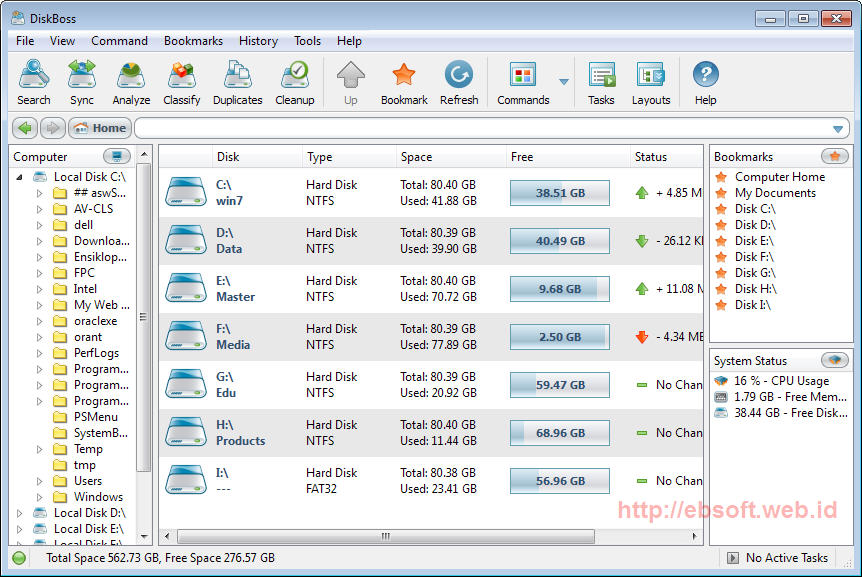
DiskBoss (File & Disk Manager lengkap dalam satu program)

Ketika data atau file yang ada di komputer sudah mulai penuh, ada saatnya kita memeriksa data-data yang menggunakan space komputer terlalu besar dan mulai bersih-bersih data data lama yang tidak terpakai. Ada beberapa software gratis yang bisa kita gunakan, salah satunya yang mempunyai banyak fitur adalah DiskBoss.
Sebelumnya saya sudah pernah mengulas berbagai software gratis untuk memeriksa atau menganalisa penggunakan space di hardisk, Kini ada alternatif lainnya yang tidak hanya memberikan informasi penggunaan space hardisk, tetapi dilengkapi dengan berbagai fitur menarik lainnya, namanya DiskBoss.
Versi gratis (freeware) DiskBoss dapat kita gunakan gratis untuk penggunaan personal. Selain dapat digunakan sebagai file manager, DiskBoss mempunyai beberapa fitur utama lainnya, diantaranya :
  • Menganalisa penggunaan space hardisk
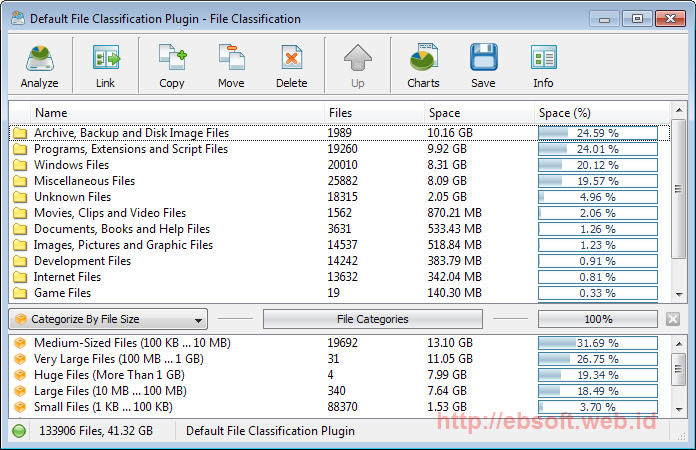
  • Klasifikasi dan kategori penggunaan space hardisk berdasar kriteria tertentu
  • Duplicate file finder, untuk mencari file-file yang sama (duplikat) yang ada di hardisk serta menghapus salah satunya
  • File Synchronization, untuk melakukan sinkronisasi file antar dua media atau 2 lokasi yang berbeda
  • Pencarian file dengan berbagai kriteria
  • Membuat perintah tertentu berdasar pencarian, analisa space hardisk, kategori file tertentu dan lainnya.
  • Fitur untuk menyimpan hasil analisa ke dalam format HTML
Melihat berbagai fitur diatas, sepertinya DiskBoss dapat digunakan sebagai pengganti beberapa software, karena disana sudah disertakan fitur seperti analisa penggunaan space hardisk, sinkronisasi, duplicate file finder, klasifikasi file dan lainnya. Meskipun fitur untuk membuat perintah (Commands) hanya dibatasi sebanyak 3 di edisi gratis.
Download Software PPOB Interlink 2014

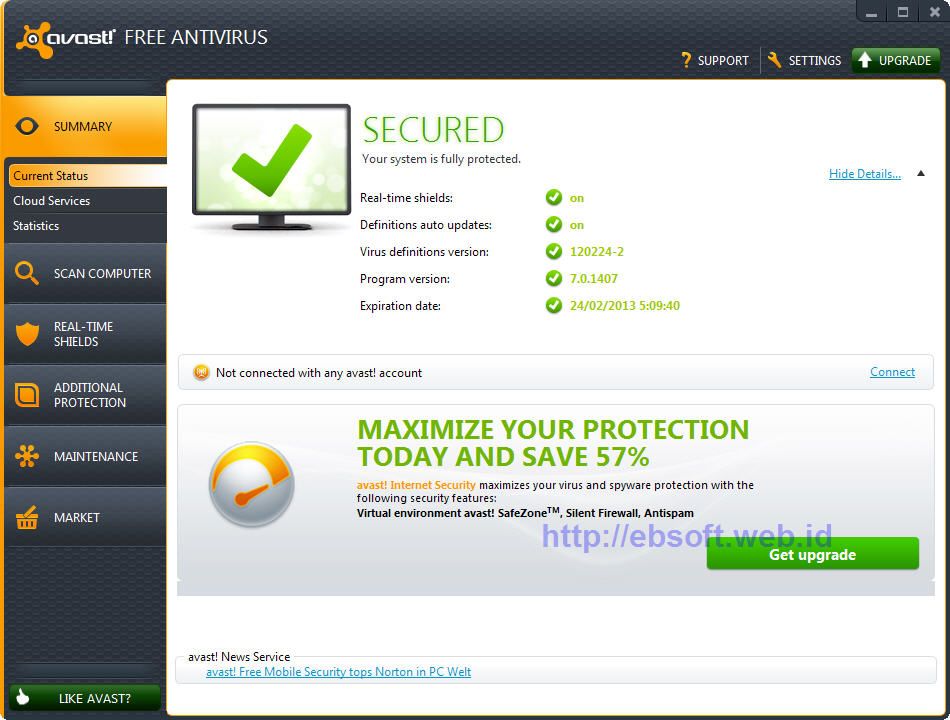
Download Terbaru Avast Free Antivirus 7

Setelah sebelumnya merilis versi beta, akhirnya tepat 1 tahun sejak versi 6 dirilis, kemarin Avast secara resmi merilis versi baru untuk produk Antivirusnya, meliputi Avast Free Antivirus 7, Avas Pro Antivirus 7 dan Avast Internet Security 7. Bagaimana fitur dan kemampuan jika dibandingkan versi sebelumnya?
Avast merupakan salah satu vendor yang menyediakan antivirus gratis, dan merupakan salah satu antivirus yang cukup banyak digunakan oleh pengguna komputer, karena meskipun versi gratis, tetapi fitur yang disertakan cukup banyak dan mungkin tergolong lengkap dibanding antivirus gratis lainnya.
Di versi 7 ini, Avast sepertinya fokus pada perbaikan baik performa maupun tampilan dibanding versi 6, meskipun ada juga beberapa penambahan fitur baru. Update dan perbaikan di versi 7 adalah sebagai berikut :
  • Reputation scanning via FileRep (cloud-based)
  • Update virus database secara streaming (real-time)
  • Perbaikan fitur Sanbox & Autosanbox
  • Adanya fitur Remote Assistance
  • Peningkatan fitur proteksi web browser (termasuk anti phising)
  • Installer yang baru
  • Export dan Import Setting
  • Perbaikan dan perubahan tampilan baru
  • Perubahan tampilan screensaver avast
  • Kini bisa berjalan di Windows 8 Developer preview
  • Berbagai perbaikan dan peningkatan masalah keamanan dan kestabilan aplikasi.
Avast menyatakan bahwa bagi pengguna versi 6 dapat langsung menginstall versi 7 karena proses update sudah terintegrasi dengan installer. Tetapi jika masih belum berhasil, download saja avast uninstall utility awsclear.exe dan jalankan melalui safe mode windows untuk melakukan uninstall avast secara bersih.
Download Software PPOB Interlink 2014